
Want to make your knowledge base articles easier to read and your instructions easier to follow? Quit the throat-clearing. Cut the Notes. Stop writing stuff like this:
- Note: This is the default when this field is left empty.
- Note: Do not start this process until you are sure you have enough time to do it in one sitting. Exiting out of the Duo Mobile setup without completing the other steps below may require you to call the Help Desk to unlock the account.
- Note: If you do not have a Company Name or DBA, reenter your Business Legal Name in this field.
How Notes hurt KB articles
To make them predictable and easy to scan, KB articles have structure: clearly named sections, first-level and second-level headings, bulleted and numbered lists, etc. But when KB writers drop in a Note, these asides disrupt the article’s structure. For example, a Note on the second step in a four-step procedure probably could have been a fifth step. Or a Note in the article’s Resolution section is actually a workaround, which belongs in the Workaround section, of course.
“Note” is a nearly meaningless label for any piece of information. Unlike more specific labels, such as “Warning” or “Preparation,” the word “Note” doesn’t hint at the content of what will follow. All the label “Note” can convey is that the writer has the urge to tell the reader something. “Note” is a little like saying to the reader, “Look over here.” A Note can grab the reader’s attention, but it can’t do much to help the reader synthesize the info in the Note with the other info nearby.
Four kinds of damage done by Notes
1. Notes obscure action items. NC State University’s OIT Public Knowledge Base contains a short, five-step, 140-word KB article, “Connect to the NC State VPN.” But a Note in Step 5 is confusing: “Note: This is the default when this field is left empty.” Which is the default? And do I need to do anything? Do you mean “This is the default when you leave the field empty?” or “Decide whether to keep or change the default?”
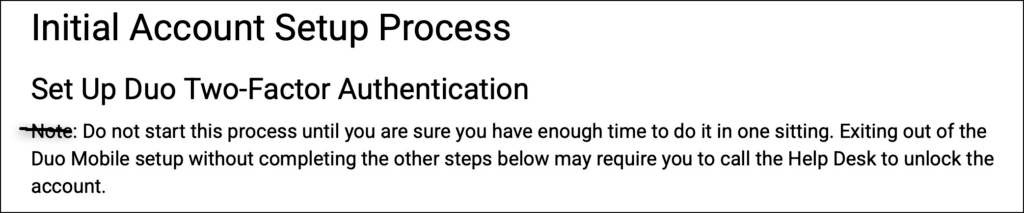
2. Notes obscure context. At 313,214 views to date, this “Initial Password Change” article is the most frequently viewed in the OIT Public Knowledge Base. With that much attention, it had better be written well, and generally, it is. The article helps readers understand the process for setting up an NC State account, overall, and then provides specific sets of steps to complete each task. It has only one Note, which begins “Do not start this process until you are sure you have enough time to do it in one sitting…” That advice is context, and the “Set Up Duo Two-Factor Authentication” heading above the Note is clear enough that the word “Note” just isn’t necessary.
3. Notes allow sloppy thinking. The Institute for Public Procurement’s knowledge base contains an article titled “What is the most efficient way to pay for my membership?” I know the organization wants people to find this payment article easy to read! The article explains that paying online is easiest, but members can also pay by check or credit card. The very last sentence is a Note: “Only the Agency Representative may add or remove individuals from the organization’s membership online during renewal.”
This Note raises questions instead of answering them. Why are you telling me about removing members in an article about paying for membership? Is paying for an individual membership different from paying for an organization’s membership? Do I need to ask an Agency Representative to add me to my organization’s membership? I can’t tell whether this Note contains essential information or unrelated information. It’s the very definition of sloppy.
4. Notes make difficult content more difficult. Maryland has a knowledge base for eMaryland Marketplace Advantage (eMMA), the state’s official online procurement system. As you might imagine, the KB article “Start Your Vendor Registration, Part I (Vendor)” is complex. With this much info about vendor registration, they needed a Part 2! In fact, the Part 1 KB article is 1,900 words long, has 21 screen shots, and offers detailed instructions for the 15 steps required to start your vendor registration. That’s a lot. It also contains 16 Notes. The Overview section itself contains three Notes. When there are more Notes than steps, we know the KB has a problem. These writers are making readers work too hard.
Better ways to handle Notes
1. Present the Note as an overview statement before the steps begin. Remove the label “Note” and just present the content. For example, the “Initial Password Change” article includes the H2, H3, and Note content (see screenshot, below). The label “Note” isn’t necessary. The two headings provide the logical structure to hold the information in the Note, which reminds the user to complete the process in one sitting.
2. Present the Note as one of the numbered steps. Duke University’s OIT knowledge base includes the article “Dukeblue: Getting connected to Linux,” which presents more than eleven steps to getting connected. This Note appears before Step 1: “Make sure the machine is within range of an 802.11 AP that’s broadcasting the Dukeblue SSID.” That Note should be Step 1. Making sure the machine is within range is the first step of the task, not something to merely note before completing the task in earnest.
3. Replace the label “Note” with a more informative word. The audio technology manufacturer Shure has this article in its knowledge base: “MOTIV Mobile Apps: Best Practices for Recording and Livestreaming.” Near the end, the KB article includes a bit of specific advice for iOS 26 users. Instead of using the label “Note,” the writers chose a better label: “iOS 26 users.” This user-specific label helps more than “Note” partly because it frees non-iOS 26 users from having to read the content.
Try one of these labels instead of “Note”
- For Contractors
- For Employees
- Limitations
- Options
- Reminder
- Version
- Warning
Just like a fever that keeps your kid home from school, Notes are a symptom that your KB article is too ill to do its job. Notes allow logical clutter and distracting asides. Want healthy KB content? Find a home for each Note within the structure of the article.
Photo credit: by Hugo Rocha on Unsplash


0 Comments